New Features of the com0com driver
the source code of the driver with the new features is here.
See at line 1035 in .\sys\ioctl.c
IOCTL_SERIAL_DRIVER_VERSION
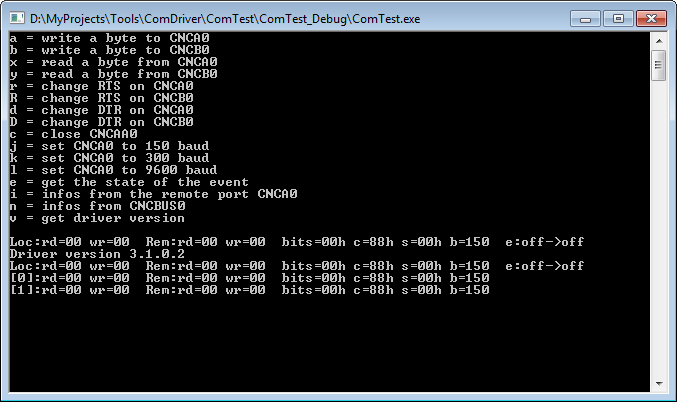
In the ComTest program press 'v' to show the driver version.
i.e. :
     HANDLE hCncBus;
     DWORD  dwVersion;
     DWORD  dwBytes;

     dwVersion = 0;

     hCncBus = CreateFile("\\\\?\\GLOBALROOT\\Device\\CNCBUS0",GENERIC_READ|GENERIC_WRITE,0,0,OPEN_EXISTING,FILE_ATTRIBUTE_NORMAL,0);

     if(!DeviceIoControl(hCncBus,IOCTL_SERIAL_DRIVER_VERSION,NULL,0,&dwVersion,sizeof(DWORD),&dwBytes,NULL))
          {
          printf("Can't driver version\n");
          return 0;
          }

     printf("Driver version %i.%i.%i.%i\n",(dwVersion>>24)&0xFF,(dwVersion>>16)&0xFF,(dwVersion>>8)&0xFF,(dwVersion>>0)&0xFF);
See at line 1097 in .\sys\ioctl.c
IOCTL_SERIAL_SET_EVENT
You can add an event to a port. The event will be signaled wenn the other port side sends data, or changes the baud rate.
In the ComTest program press 'j' and 'k' to change the baudrate, and you will see the signaled event (see at "... e: ...")
i.e. :
     HANDLE          hHandle;
     DWORD           dwBytes;
     C0C_EVENT_DATA  sData;

     sData.EVENT.aDummy[1] = 0;
     sData.EVENT.hEvent    = CreateEvent(NULL,TRUE,FALSE,NULL);
     sData.uEnventMask     = C0C_EVENT_ALL;  // i.e. C0C_EVENT_BAUDRATE only for baud changes
     sData.uChild          = 0;

     hHandle = CreateFile("\\\\.\\CNCA0",GENERIC_READ|GENERIC_WRITE,0,0,OPEN_EXISTING,FILE_ATTRIBUTE_NORMAL,0);

     if(!DeviceIoControl(hHandle,IOCTL_SERIAL_SET_EVENT,&sData,sizeof(sData),NULL,0,&dwBytes,NULL))
          {
          printf("Can't attach event\n");
          return 0;
          }
Get Informations of a port
See at line 1046 in .\sys\ioctl.c
IOCTL_SERIAL_PORT_INFO
You can get information from a port. The informations are the sended and received bytes the baudrate, the state of the hanshake lines, a process id ...
In the ComTest program press 'i' and 'n' to change the baudrate, and you will see the signaled event (see at "... e: ...")
i.e. :
     HANDLE          hHandle;
     DWORD           dwBytes;
     DWORD           dwChild;
     C0C_PORT_INFO   sInfo;


     hHandle = CreateFile("\\\\.\\CNCA0",GENERIC_READ|GENERIC_WRITE,0,0,OPEN_EXISTING,FILE_ATTRIBUTE_NORMAL,0);

     if(!DeviceIoControl(hHandle,IOCTL_SERIAL_PORT_INFO,NULL,0,&sInfo,sizeof(sInfo),&dwBytes,NULL))
          {
          printf("Can't port informations\n");
          return 0;
          }


     hCncBus = CreateFile("\\\\?\\GLOBALROOT\\Device\\CNCBUS0",GENERIC_READ|GENERIC_WRITE,0,0,OPEN_EXISTING,FILE_ATTRIBUTE_NORMAL,0);
     dwChild = 0;  // use 0 for CNCA0 or 1 for CNCB0

     if(!DeviceIoControl(hCncBus,IOCTL_SERIAL_PORT_INFO,&wChild,sizeof(dwChild),&sInfo,sizeof(sInfo),&dwBytes,NULL))
          {
          printf("Can't port informations\n");
          return 0;
          }